<?xml version="1.0" encoding="utf-8"?><feed xmlns="http://www.w3.org/2005/Atom" ><generator uri="https://jekyllrb.com/" version="3.10.0">Jekyll</generator><link href="https://hindman.github.io/feed.xml" rel="self" type="application/atom+xml" /><link href="https://hindman.github.io/" rel="alternate" type="text/html" /><updated>2026-09-20T23:35:53-07:00</updated><id>https://hindman.github.io/feed.xml</id><title type="html">The Fifth Fret</title><subtitle>Essays on guitar, history, and politics.</subtitle><author><name>{&quot;name&quot;=&gt;&quot;&quot;, &quot;avatar&quot;=&gt;&quot;/assets/images/juan-gris-guitar-color.jpg&quot;, &quot;bio&quot;=&gt;&quot;&quot;}</name></author><entry><title type="html">Of mice and menus: an interface tragedy</title><link href="https://hindman.github.io/mice-menus/" rel="alternate" type="text/html" title="Of mice and menus: an interface tragedy" /><published>2026-05-31T00:00:00-07:00</published><updated>2026-05-31T00:00:00-07:00</updated><id>https://hindman.github.io/mice-menus</id><content type="html" xml:base="https://hindman.github.io/mice-menus/"><![CDATA[<!--

## The trouble with mice
## The command-line and its constraints
## Raskin's case against modes
## The Canon Cat: theory meets practice
## There will be modes
## Modes all the way down
## The Llama
## The tragedy

-->

<p>All software faces a basic question: how does the user tell it what to do?
Since the 1980s the dominant model has been drearily consistent: reach for the
mouse, navigate into an application’s menus, and click the needed operation.
Ordinary navigational tasks are similar, minus the menus: reach, point,
scroll, click. Keyboard shortcuts for some of those operations exist. Nearly
all users learn a handful — copy, paste, print, arrow keys — and stop there.
Some users invest real effort to learn the key bindings of applications they
use heavily, but even the office expert in Excel hits a ceiling: the brain
will hold only so many arbitrary <code class="language-plaintext highlighter-rouge">Ctrl-Alt</code> combinations.</p>

<p>I recently completed <a href="/loopllama/">LoopLlama</a>, a browser-based tool for close study
of YouTube videos. The application has menus and familiar mouse-oriented
controls such as buttons, dropdowns, and toggles. But at its core, LoopLlama
has a keyboard-first design: my goal was to control everything with simple key
presses while holding a guitar and wearing a thumb pick. Building it sharpened
my convictions, and the application is a distilled example of a better
interface paradigm — one with strong historical precedents that computing
culture ignored as it solidified in the late twentieth century.</p>

<h2 id="the-trouble-with-mice">The trouble with mice</h2>

<p>The mouse is an instrument tuned for spatial actions: pointing, dragging,
positioning, drawing — tasks with a direct mapping between hand movement and
cursor position.</p>

<p>Command input is not that. When a user reaches for the mouse to invoke a menu
item or to navigate, nothing about the operation requires pointing. The action
is discrete: the user wants to save a file, undo a change, or toggle a
setting. The mouse arrives at the target by the same mechanism it uses to draw
a curve — slow physical travel, target acquisition, and click — but the
curve-drawing precision is wasted. You do not need a pointing instrument to
say “save.” Like a caveman, you point for routine actions only because you
lack the words.</p>

<p>The costs are individually tiny, but across a day of mousing the ergonomic and
time tax adds up. Mouse operations are also not readily chained or scripted.
The keyboard, by contrast, is already where the hands are, and its input is
precise and composes naturally into automated operations.</p>

<p>The problem was recognized early in computing history. Two examples will
suffice:</p>

<ul>
  <li>
    <p><a href="https://en.wikipedia.org/wiki/Douglas_Engelbart">Douglas Engelbart</a> led the Augmentation Research
Center in SRI International during the 1960s. In 1968, Engelbart and other
ARC staffers presented their <a href="https://en.wikipedia.org/wiki/NLS_(computer_system)">oN-Line System</a> (NLS), which introduced
many of the elements of modern, interactive computing, including the
computer mouse. The presentation was so striking to subsequent observers
that it became known as <a href="https://en.wikipedia.org/wiki/The_Mother_of_All_Demos">The Mother of All Demos</a>. Aiming to
make knowledge work more powerful, Engelbart and his team understood the
division of labor sketched above. NLS paired the mouse with the keyboard:
the mouse for spatial tasks, the keyboard for text entry and commands.<sup id="fnref:1" role="doc-noteref"><a href="#fn:1" class="footnote" rel="footnote">1</a></sup>
Only the pointing half of that vision survived contact with the
marketplace.</p>
  </li>
  <li>
    <p>Later in the 1980s and 1990s, human-computer interface expert <a href="https://en.wikipedia.org/wiki/Jef_Raskin">Jef
Raskin</a> put the case in more rigorous terms, drawing on
empirical models of human motor performance and task completion time.<sup id="fnref:2" role="doc-noteref"><a href="#fn:2" class="footnote" rel="footnote">2</a></sup>
Applied to command input, they confirmed and quantified the argument:
mouse operations are slower than keyboard equivalents for commands.</p>
  </li>
</ul>

<h2 id="the-command-line-and-its-constraints">The command-line and its constraints</h2>

<p>Although the consumer market would become dominated by mouse-and-menus, an
older tradition — Unix and the command-line world — had built a culture around
keyboard primacy. Since command-line computing became powerful before the
mouse existed as a widely available device, the mouse could only augment it at
the margins.</p>

<p>Applications in that computing tradition faced an unavoidable constraint:
their large command vocabularies exceeded the keyboard’s limited real estate.
A typical modern keyboard has about 50 keys producing regular characters, and
only 26 of them (the letters) have obvious mnemonic potential. LoopLlama, for
example, is a rich application for its purpose, but it is tiny compared to the
software that computer users spend the most time with: word processors,
spreadsheet applications, web browsers, and many others. LoopLlama has roughly
100 bindings to cover its operations — already twice the keyboard’s raw
capacity.</p>

<p>The dominant answer to that constraint was keyboard expansion, along two
pathways. One was additive: function keys, a dedicated row of extra keys above
the main keyboard, provided 12 new binding slots.</p>

<p>The second was multiplicative: modifier keys. A keyboard’s default behavior is
to emit a character on each key press; a modifier intercepts that signal and
redirects it, allowing the same key to serve double duty. As modifiers
accumulated over time — <code class="language-plaintext highlighter-rouge">Ctrl</code> in early terminals, <code class="language-plaintext highlighter-rouge">Alt</code> from the IBM PC,
<code class="language-plaintext highlighter-rouge">Cmd</code> and <code class="language-plaintext highlighter-rouge">Option</code> from the Mac — the available binding space grew
accordingly.</p>

<p>By the end of the 1990s, a keyboard-oriented user had not only more keys —
function keys, arrows, a navigational cluster, and a number keypad — but also
several modifiers. The net effect was substantial. Applications running in
those environments had hundreds of available binding slots, roughly 800 by my
back-of-the-envelope calculation.</p>

<p>Although the expansion of key binding real estate was impressive in raw
numbers, most of that terrain turned out to be useless in practice, because
humans cannot remember the bindings. The letter component of a binding can
carry meaning: <code class="language-plaintext highlighter-rouge">Ctrl-p</code> for print, <code class="language-plaintext highlighter-rouge">Ctrl-s</code> for save, <code class="language-plaintext highlighter-rouge">Ctrl-c</code> for copy. But the
modifiers themselves are abstractions. Any given operation might use <code class="language-plaintext highlighter-rouge">Ctrl</code>,
<code class="language-plaintext highlighter-rouge">Ctrl-Shift</code>, <code class="language-plaintext highlighter-rouge">Ctrl-Alt</code>, or something more elaborate. Under favorable
conditions, a well-designed application could group bindings thematically
under different modifier combinations to reduce the mnemonic burden. In
practice, the logic behind the binding schemes of many major applications is
somewhere between opaque and non-existent.</p>

<p>The other problem with the modifier strategy is physical. Although <code class="language-plaintext highlighter-rouge">Shift</code>
sits at the natural extension of the pinky, the primary modifiers for issuing
commands are ergonomic disasters, involving either awkward stretches to reach
a single modifier or full shifts out of typing position to press more than
one.</p>

<p>In the consumer market, a third pathway emerged. For many operations, there
would simply be no key binding. Most users learned a handful of keyboard
shortcuts and stopped there. The rest of their command vocabulary lived behind
menus and long days of point and click.</p>

<p>One response to those constraints was a call to embrace expertise — to stop
complaining about the difficulty of keyboard mastery and invest the effort to
achieve it. No one made that case more vividly than <a href="https://web.stanford.edu/class/cs81n/command.txt">Neal
Stephenson</a> in the 1999 essay, “In the Beginning… Was the
Command Line”, which portrayed Linux as a freely available tank, Windows as a
breakdown-prone station wagon, and Mac as an elegant but confining sports car.
Stephenson understood why so many users opted for the initial ease and
reassurance of purchasing from a friendly dealer, but he upheld the virtues of
the few who would invest the time to learn how to drive and maintain a tank.</p>

<p>Stephenson’s case addresses a minority; a related question about expertise
applies broadly. Because their needs do not justify it, most people will never
invest that heavily in most of the software they use. But most people have at
least one application they use often enough to warrant such investment: the
person who spends a significant chunk of every workday in Word, Excel, or
Outlook; the retiree who manages a photo collection in Lightroom; the teacher
who assembles lecture slides in PowerPoint. Additional expertise would pay
off, but if the route to expertise goes through a thicket of modifier-based
key bindings, few will make the journey.</p>

<h2 id="raskins-case-against-modes">Raskin’s case against modes</h2>

<p>Interface expert Jef Raskin had long criticized both computing paradigms on
offer. On one pole was the expert-oriented computing tradition of Unix and the
command-line. Although powerful, this user interface provided poor visual
feedback and was too demanding for ordinary computer users. Since it had
already lost any claim on the mainstream, it was not his primary target.
Meanwhile, the <a href="https://en.wikipedia.org/wiki/Graphical_user_interface">GUI</a> systems from Microsoft and Apple had become
almost as opaque as the command-line systems they replaced, with deep menu
hierarchies that required users to know where to look when trying to perform a
task — a mnemonic burden in a new form.</p>

<p>In 2000, Raskin published <a href="https://raskincenter.org/jef/humane-interface/"><em>The Humane Interface</em></a>, which
brought together critiques he had been developing since the 1980s. The book’s
guiding claims were that interfaces should prioritize alignment with human
cognition rather than computer internals and that design should aim to
increase efficiency for all users, not just dedicated experts.</p>

<p>Both cognitive science and everyday experience show that practiced actions
become automatic: driving, typing, using a TV remote, riding a bicycle. A
central idea in Raskin’s work is that good interfaces should aim to support
automaticity — for users to stop consciously deciding and simply to act. By
contrast, interfaces that change from version to version; that have different
behaviors in different contexts, forcing users to track state; that provide
insufficient feedback or have large delays between action and response; that
have high error costs (for example, no undo) — such traits force users to act
consciously rather than automatically.</p>

<p>Raskin identified modes as the most systematic of these failures. A mode is a
state of the interface in which the same user action produces different
results. The computing environment of the 1980s and 1990s supplied vivid
examples: the <code class="language-plaintext highlighter-rouge">Caps Lock</code> key, inherited from the typewriter, which silently
converted letter key presses to uppercase; word processors that toggled
between inserting and overwriting text; image editors and presentation tools
that required the user to track which drawing tool was active; and vi, the
command-line world’s dominant text editor, built on a modal foundation. In
each case, the same action — a key press or a mouse click — produced different
results depending on application state that the user had to remember.</p>

<p>In such interfaces, mode errors can occur any time the user becomes too
preoccupied or rushed. Such errors were bothersome for novice users, but
Raskin’s deeper critique emphasized how they undermined the automaticity that
experts depend on. The same automaticity that makes experts efficient makes
them particularly vulnerable to mode errors: the more fluidly an expert works,
the longer they operate in the wrong mode before noticing — and the more
damage accumulates.</p>

<p>Raskin’s prescription followed from the diagnosis: modes should be eliminated
whenever possible. Where they could not be, his preferred alternative was the
quasimode — a held key, active only while pressed. Unlike a persistent mode, a
quasimode cannot be easily forgotten because it is tactile.</p>

<h2 id="the-canon-cat-theory-meets-practice">The Canon Cat: theory meets practice</h2>

<p>Although Raskin had played a leading role in an early phase of the Macintosh
project, he was disappointed by the result — mouse-heavy, dependent on menus,
prone to modal interruptions. In 1987, he led the design of an alternative: the
<a href="https://en.wikipedia.org/wiki/Canon_Cat">Canon Cat</a>, a word-processing computer that put into practice
the <a href="https://www.youtube.com/watch?v=o_TlE_U_X3c">interface principles</a> he would later codify in <em>The Humane
Interface</em>.</p>

<p>Following those principles, the Cat’s design rejected two of the three
keyboard real estate strategies: the surrender approach, which exiled
low-priority operations to menus; and modes, his primary target. That left
keyboard expansion, specifically with modifiers. The <a href="https://vintagecomputer.ca/wp-content/uploads/2016/04/Canon-Cat-keyboard.jpg">Cat
innovated</a> on that approach in two ways:</p>

<ul>
  <li>
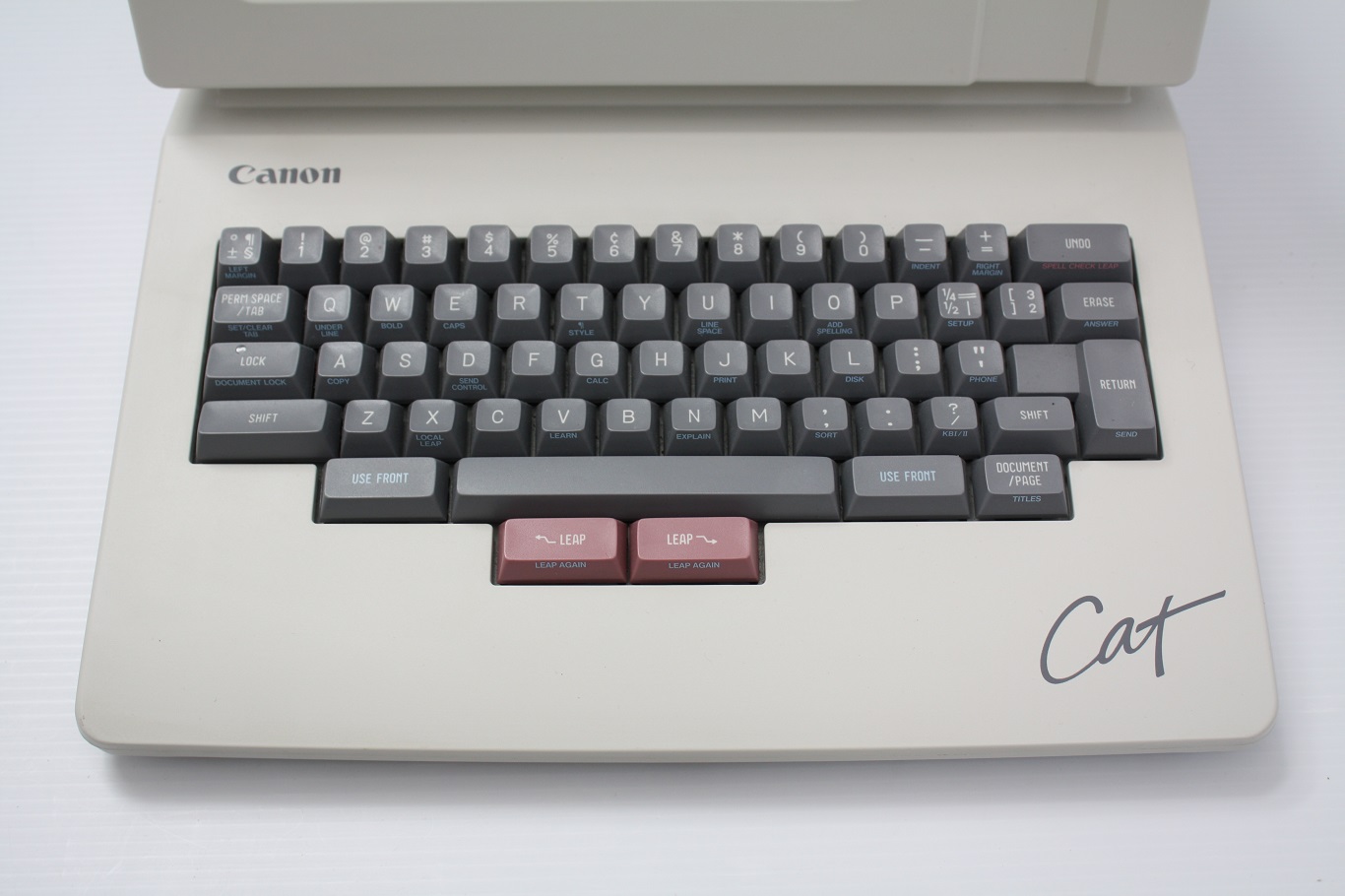
    <p>The first was a pair of <code class="language-plaintext highlighter-rouge">USE FRONT</code> keys, positioned on the left and right
sides of the spacebar, replacing the usual modifier keys in those spots.
The <code class="language-plaintext highlighter-rouge">USE FRONT</code> keys activated a quasimode: holding the key changed the
keyboard’s behavior. The payload was printed on the front edges of the
keys — Copy, Calc, Print, Bold, Indent, Spell Checker, and so on. The
hardware documented the software.</p>
  </li>
  <li>
    <p>The second was a pair of <code class="language-plaintext highlighter-rouge">LEAP</code> keys, positioned below the spacebar for
thumb operation — a significant ergonomic improvement over the usual
modifiers. Holding <code class="language-plaintext highlighter-rouge">LEAP</code> while typing a literal string moved the cursor
dynamically through the document as each character was entered — in
effect, an incremental search. The same mechanism supported text
selection: position the cursor at one endpoint, <code class="language-plaintext highlighter-rouge">LEAP</code> to the other, and
then press both <code class="language-plaintext highlighter-rouge">LEAP</code> keys simultaneously to select the text between.
Like <code class="language-plaintext highlighter-rouge">USE FRONT</code>, the <code class="language-plaintext highlighter-rouge">LEAP</code> keys were quasimodal, active only while held,
so their effect on the keyboard’s behavior was always explicit and
tactile.</p>
  </li>
</ul>

<p>The Cat sold poorly and was discontinued after <a href="https://raskincenter.org/jef/published/cat-manual/">six months</a> on
the market. That failure could be attributed to bad timing or business
strategy, but my judgment is that the Cat was built on a deeply flawed vision.
Three problems stand out:</p>

<p>The first flaw was that the Cat ultimately embraced the surrender strategy.
The GUI market surrendered by exiling lower-priority operations to menus. The
Cat avoided that move, but only by restricting what the device could do. It
was primarily a word-processing appliance, not a general-purpose computer. It
had computing at the margins — a calculator accessible via the Calc key, and a
lower-level toolchain for <a href="https://en.wikipedia.org/wiki/Forth_(programming_language)">Forth</a> and <a href="https://en.wikipedia.org/wiki/Assembly_language">assembly</a> —
but it had no support for third-party software. The operation catalog could
fit on the front edges of the keys precisely because the domain had been so
thoroughly narrowed.</p>

<p>The second flaw was that <code class="language-plaintext highlighter-rouge">LEAP</code>, as the Cat’s sole navigation primitive, failed
both ends of the user spectrum, leaving it in an interface sour spot:</p>

<ul>
  <li>
    <p>For beginners, the Cat was an <a href="https://en.wikipedia.org/wiki/RTFM">RTFM</a> device from the start. It
had no arrow keys, leaving novices stranded. The <code class="language-plaintext highlighter-rouge">LEAP</code> keys could move the
cursor one character at a time (called “creeping”), but the manual
admonished users not to rely on creeping as a crutch. After a user learned
to leap, the physical tax was permanent, because every navigation required
holding <code class="language-plaintext highlighter-rouge">LEAP</code> while typing a search string. That is the inescapable cost of
the quasimode approach — the same cost paid by every modifier scheme — but
magnified to include entire query strings. Finally, although the promotional
video made the Cat look effortless, for less frequent operations the user
manual told a different story: the instructions took real effort to
decipher, and the key sequences seemed balky.</p>
  </li>
  <li>
    <p>For intermediate and expert users, the ceiling was low. Leaping was literal
text search: no wildcards, <a href="https://en.wikipedia.org/wiki/Regular_expression">regular expressions</a>, or text
objects.<sup id="fnref:3" role="doc-noteref"><a href="#fn:3" class="footnote" rel="footnote">3</a></sup> GUI word processors had long offered at least wildcards and
navigational support for words and paragraphs. Command-line editors went
much farther on both fronts. The best the user manual could offer was
approximate literal-search workarounds for some text objects.</p>
  </li>
</ul>

<p>The Cat’s third flaw cut deepest, because it was a theory violation, not just
a limit. Its cursor had two states — wide and narrow — that controlled the
direction of text erasure and whether typing would insert or replace existing
text. By Raskin’s own definition, this is a mode — and not a peripheral one.
More striking still: the same behavior is found in vi, the command-line text
editor proudly standing on the opposite side of the modes debate. Vi users
switch between normal mode, insert mode, and replace mode — distinctions
conveyed via cursor shape, just like the Cat. The most determined opponent of
modes in computing built them into his signature product.</p>

<h2 id="there-will-be-modes">There will be modes</h2>

<p>The Cat’s cursor mode is a clear violation of Raskin’s own theory and a clue
that wisdom lies in the recognition that modes are unavoidable.</p>

<p><span class="phead">Applications required</span>. The logical case begins with
the inevitability of applications. To modern computer users, that is a
puzzling place to start — a claim so obvious as to be hardly worth making. But
Raskin’s writing and the Cat’s advertising material sometimes conveyed the
idea that computer users should not have to bother with pesky details like
applications, desktops, directories, and even files. At the same time, a
<a href="https://www.youtube.com/watch?v=o_TlE_U_X3c">promotional video</a> for the Cat explicitly mentions spreadsheets
and database applications running on the device. The admission was compelled
because, by 1987, such applications were becoming standard in office
computing. The video glosses over the contradiction: was the Cat an appliance
optimized for editing text or a general-purpose computer? Anyone who has spent
serious time in a spreadsheet application knows how fanciful that vision is. A
spreadsheet is not a word processor, and a database application is not a
spreadsheet. Each involves different data, different tasks, and thus different
interfaces. Cramming Excel into a text editor will not cut it.</p>

<p><span class="phead">Applications are modes</span>. Each application’s
interface is a mode — a state in which the same keyboard and mouse inputs
produce different results. To grant that different applications require their
own interfaces — and there is no plausible argument against — is to grant that
some modes are unavoidable.</p>

<p><span class="phead">Modes within applications</span>. The same reasoning
applies at the next level down. Many applications need to support multiple
kinds of work. Mapping applications have searching and exploring, but also
direct navigation to a destination. Presentation software is used to create
slides and present them. More relevant for our purposes, many applications —
notably, word processors, text editors, and spreadsheets — need to support at
least two types of work: directly typing text versus issuing commands for
editing and navigation. The more distinct the tasks, the stronger the case for
distinct interfaces. Modes enter the scene again.</p>

<p><span class="phead">Refutation by counterexample: QED</span>. If computing
operates with at least two irreducible layers of modes — applications and then
major task interfaces within them — a blanket prohibition cannot stand. In
fairness, Raskin’s views were not that rigid, but he did make strong claims
about the harmfulness of modes and his goal to eliminate them. At this point,
however, a strong anti-modes stance has lost its footing: the debate is no
longer whether modes are harmful or should exist; it shifts to sharper
questions.</p>

<p>Those questions concern what makes modes cognitively manageable and worth
having. Several criteria matter:</p>

<ul>
  <li>
    <p>Visibility. A hidden mode will be forgotten, leading to errors. A clear
indicator keeps the current mode in peripheral awareness without demanding
attention.</p>
  </li>
  <li>
    <p>Task clarity. The mode should correspond to work the user recognizes as
meaningfully distinct. Modes organized around clear task differences give
users a mental model: they implicitly know the current mode because they
know what they are doing.</p>
  </li>
  <li>
    <p>Switching cost-benefit. The transition should be easy and deliberate —
frictionless when you mean to switch, specific enough to prevent
accidents. And the mode’s value should justify the real estate cost of its
entry binding.</p>
  </li>
  <li>
    <p>Risk. Some mode errors are easily reversible; others can destroy work. The
severity is part of the cost-benefit ledger.</p>
  </li>
</ul>

<p>Two classic examples illustrate how the criteria play out:</p>

<ul>
  <li>
    <p><code class="language-plaintext highlighter-rouge">Caps Lock</code> fails on most of them. Its indicator — at most, a small LED on
some keyboards — is easy to overlook. Accidental activation is common
because the key occupies prime real estate, where an errant pinky can
easily land. And the task it serves — sustained all-caps typing — is
infrequent for most users, with cheap workarounds in any modern editor.
Valuable real estate, frequent mistakes, uncommon task: the cost-benefit
is badly skewed.</p>
  </li>
  <li>
    <p>Vi’s insert and normal modes tell the other story. The task distinction is
meaningful: typing text versus issuing commands. Switching cost is low:
one key press in each direction. The risk from mode errors is real but
substantially mitigated by vi’s strong undo system. The main shortcoming
is visibility: a cursor-shape change alone — the mechanism used by the Cat
— is too subtle. On balance, these modes earn their place.</p>
  </li>
</ul>

<p>Raskin’s core concern about modes was automaticity — that users would have to
maintain conscious awareness of the current mode, and that this overhead would
prevent frequent actions from becoming practiced habits. The concern is valid
for poorly designed modes, but it gets the causation backward for
well-designed ones. A mode organized around a clear task distinction does not
burden the user’s cognitive apparatus — it becomes part of it. In vi, normal
and insert modes do not interfere with each other because the system’s
organization is sensible. The modes become an organizing hook — similar to the
conceptual order that applications supply at a higher level.</p>

<h2 id="modes-all-the-way-down">Modes all the way down</h2>

<p>Accepting that modes are inevitable and cognitively sound closes the case
against them and reopens the keyboard real estate strategy Raskin had
foreclosed: using modes to solve the problem directly.</p>

<p>That problem was a mismatch between command vocabulary size and available
binding slots, producing the approaches already described: function keys,
modifiers, and surrender to menus. All of them shared an assumption: that the
keyboard’s default job is to emit characters, so bindings must be carved out
against that baseline.</p>

<p>A dedicated typing mode dissolves the assumption. Once the application has a
specific mode for text entry, ordinary characters become available in every
other mode. The letters, digits, and punctuation marks become binding real
estate — no modifier required, no awkward reaches. Every key has the potential
to carry meaning directly (<code class="language-plaintext highlighter-rouge">d</code> for delete, <code class="language-plaintext highlighter-rouge">w</code> for word, <code class="language-plaintext highlighter-rouge">-</code> for decrease).
None of the keys are pure abstractions the way the modifiers are. A typing
mode is an architectural move that restructures the real estate problem.</p>

<p>That expansion is the first step. The second adds structure to the binding
scheme, making it more meaningful and memorable. The normal-mode bindings of
vi are illustrative. That command space is not a flat list of bindings to be
memorized; it is built from a small vocabulary of atoms governed by a grammar,
and the grammar generates operations combinatorially.</p>

<p>The atoms come in three roles. Verbs express operations, such as <code class="language-plaintext highlighter-rouge">d</code> for
delete, <code class="language-plaintext highlighter-rouge">y</code> for yank (copy), and <code class="language-plaintext highlighter-rouge">c</code> for change. Nouns name text objects or
navigation targets: for example, <code class="language-plaintext highlighter-rouge">w</code> for word start, <code class="language-plaintext highlighter-rouge">ap</code> for a paragraph
including its following blank lines, or <code class="language-plaintext highlighter-rouge">L</code> for the last line on the screen.
Quantifiers are numeric prefixes that scale the verb, the noun, or both. Users
learn those atoms, and the grammar makes their combinations largely derivable:
<code class="language-plaintext highlighter-rouge">dw</code> deletes a word; <code class="language-plaintext highlighter-rouge">d5w</code> deletes five; <code class="language-plaintext highlighter-rouge">3yap</code> yanks three paragraphs
starting with the current. Some verbs can act as stand-alone imperatives — <code class="language-plaintext highlighter-rouge">i</code>
to enter insert mode, <code class="language-plaintext highlighter-rouge">p</code> to paste — with no noun required. A modest
vocabulary of verbs and nouns can generate a wide variety of commands. The
grammar does most of the memorization work.</p>

<p>The arithmetic is striking. A modifier strategy starting with 26 letters and
adding <code class="language-plaintext highlighter-rouge">Shift</code> yields 52 binding slots. A multi-key strategy using the same 26
letters as two-character sequences yields 676 (plus another 676 if we bother
with <code class="language-plaintext highlighter-rouge">Shift</code>). But the raw count understates the advantage, because the two
approaches differ not just in quantity but in mnemonic quality. A modified
binding requires two key presses but only one of them carries meaning. In a
multi-key scheme, both keys can do so: the first key is a prefix that
organizes a family of related commands; the second identifies the specific
operation within that family.</p>

<p>A multi-key scheme dominates a modifier scheme not just quantitatively but
ergonomically: no awkward stretches, hand shifts, or simultaneous presses.</p>

<p>Finally, such binding systems have a deeper advantage. Every fluent speaker
uses a grammatical system orders of magnitude more complex than any
application’s command vocabulary. The cognitive machinery for structured,
rule-governed recall is not exotic; it is among the most practiced
capabilities humans have. Multi-key, grammar-based bindings plug into that
machinery. Modifier-based bindings do not — they are arbitrary pairings the
brain must hold by rote.</p>

<h2 id="the-llama">The Llama</h2>

<p>LoopLlama is built on those principles: a modal keyboard, an intuitive
grammar, and multi-key bindings.</p>

<p><span class="phead">Mnemonic atoms</span>. The grammar’s elements are directly
mnemonic whenever possible. The language has nouns, such as <code class="language-plaintext highlighter-rouge">v</code> for video, <code class="language-plaintext highlighter-rouge">c</code>
for chapter, <code class="language-plaintext highlighter-rouge">s</code> for section, or <code class="language-plaintext highlighter-rouge">m</code> for mark. And it has verbs like <code class="language-plaintext highlighter-rouge">e</code> for
edit, <code class="language-plaintext highlighter-rouge">j</code> for jump, <code class="language-plaintext highlighter-rouge">d</code> for delete, or <code class="language-plaintext highlighter-rouge">z</code> for zoom.</p>

<p><span class="phead">Noun then verb</span>. With the vocabulary in place, the
combinations are predictable: for example, <code class="language-plaintext highlighter-rouge">ve</code> to edit the current video,
<code class="language-plaintext highlighter-rouge">mj</code> to jump to a mark, or <code class="language-plaintext highlighter-rouge">sd</code> to delete a section.</p>

<p><span class="phead">Doubles are prime real estate</span>. The most frequent
operations get the double-key bindings — the easiest sequence to type. For
example, creating a new entity uses its prefix key doubled: <code class="language-plaintext highlighter-rouge">cc</code> for chapter,
<code class="language-plaintext highlighter-rouge">ss</code> for section, <code class="language-plaintext highlighter-rouge">ll</code> for loop, and <code class="language-plaintext highlighter-rouge">mm</code> for mark.</p>

<p><span class="phead">Mnemonic exceptions, thoughtfully done</span>. As ever,
real estate is precious. For example, with the <code class="language-plaintext highlighter-rouge">s</code> and <code class="language-plaintext highlighter-rouge">l</code> prefixes already
claimed by sections and saved loops, the scratch loop (the application’s work
area for looping) needed a different prefix. The letter <code class="language-plaintext highlighter-rouge">x</code> was chosen, in
part, because it carries the connotation of “scratch out.” A related example
is the collection of bindings for the looping start and end points. Each point
has a prefix — <code class="language-plaintext highlighter-rouge">[</code> for start and <code class="language-plaintext highlighter-rouge">]</code> for end — and the bracket pair carries
the connotation of an enclosed loop. Although direct mnemonic connections are
preferred, indirect ones serve when necessary. The grammar carries most of the
cognitive load; a few departures do not break it.</p>

<p><span class="phead">Multi-key structure enables discoverability</span>. When
the user presses any binding prefix, a compact display of available
completions appears at the bottom of the screen. The user encounters the hint
at the moment of need — already reaching for the command, not browsing a
reference page. This is the scalable version of what the Canon Cat attempted
with its printed key labels: contextual, just-in-time, and
hardware-independent.</p>

<p>The cognitive demands of learning LoopLlama’s binding system are lower than
those of learning its features — which the user has to master regardless. The
bindings come nearly for free once the vocabulary is in place.</p>

<h2 id="the-tragedy">The tragedy</h2>

<p>A specific mode for direct typing, a vocabulary of nouns and verbs, and
multi-key sequences organized by grammar produce an input system that is more
capacious, memorable, and ergonomic than the mouse-menus-modifiers paradigm
can deliver. LoopLlama is evidence that the approach can be taken to its
logical conclusion. Vi is evidence that it can sustain millions of users
across decades.</p>

<p>Lock-in to suboptimal technologies is common enough in history. What converts
this outcome from unfortunate to tragic is how thoroughly experimentation
stopped. The early period of personal computing was genuinely exploratory.
Engelbart’s NLS paired mouse and keyboard on principled lines. The <a href="http://www.catb.org/~esr/writings/taoup/html/ch01s06.html">Unix
philosophy</a> of small, composable tools demonstrated the power of
keyboard-first computing — a system architecture as much as an interface. Vi
brought modal, grammar-based editing to Unix in the late 1970s. Even the
mouse-and-menus of the Mac — although a prime target of this essay’s critique
— was truly innovative. Raskin responded by designing the Canon Cat and
eventually writing <em>The Humane Interface</em>. Those efforts had their flaws, but
the field was alive to the problem. Then the Windows and Mac operating systems
won commercially, and the exploration largely ended. The major platform makers
have issued new versions for decades with minimal change to the input model.</p>

<p>That stagnation is conspicuous. Computing is the field most associated
with relentless change. Processing power, storage, networking, displays,
software distribution, and application domains have all been transformed since
the 1980s. The direct, tactile question of how the user tells the computer
what to do has not. A better approach was visible from the beginning. The
tragedy is that we looked away.</p>

<hr />

<div class="footnotes" role="doc-endnotes">
  <ol>
    <li id="fn:1" role="doc-endnote">
      <p>NLS included both a regular keyboard and a <a href="https://en.wikipedia.org/wiki/Chorded_keyboard">chorded
keyboard</a> — a five-key device held in the non-dominant
hand, used as a dedicated command interface while the mouse hand was
occupied. <a href="#fnref:1" class="reversefootnote" role="doc-backlink">&#8617;</a></p>
    </li>
    <li id="fn:2" role="doc-endnote">
      <p><a href="https://en.wikipedia.org/wiki/Fitts%27s_law">Fitts’s Law</a> predicts target-acquisition time as a function
of target distance and size, and the <a href="https://en.wikipedia.org/wiki/Keystroke-level_model">Keystroke-Level
Model</a> predicts task completion time from its physical
components. <a href="#fnref:2" class="reversefootnote" role="doc-backlink">&#8617;</a></p>
    </li>
    <li id="fn:3" role="doc-endnote">
      <p>A text object is a structural element that an editor recognizes as a
target for navigation or editing: a word, sentence, paragraph, line, or —
in code-aware editors — a parenthesized expression, quoted string, or
indented block. The user names the unit and the editor locates its
boundaries automatically: “move to the next sentence,” “delete the current
paragraph.” <a href="#fnref:3" class="reversefootnote" role="doc-backlink">&#8617;</a></p>
    </li>
  </ol>
</div>]]></content><author><name>{&quot;name&quot;=&gt;&quot;&quot;, &quot;avatar&quot;=&gt;&quot;/assets/images/juan-gris-guitar-color.jpg&quot;, &quot;bio&quot;=&gt;&quot;&quot;}</name></author><summary type="html"><![CDATA[The mouse was never the right tool for issuing routine commands — a point its inventors understood. The early history of computing produced genuine experimentation and a better alternative: modal, multi-key, grammar-based keyboard systems. Building LoopLlama provides an occasion to examine what was lost.]]></summary></entry><entry><title type="html">AI and mass unemployment: doom in three acts</title><link href="https://hindman.github.io/ai-employment/" rel="alternate" type="text/html" title="AI and mass unemployment: doom in three acts" /><published>2026-05-30T00:00:00-07:00</published><updated>2026-05-30T00:00:00-07:00</updated><id>https://hindman.github.io/ai-employment</id><content type="html" xml:base="https://hindman.github.io/ai-employment/"><![CDATA[<!--

## Prologue: they took our jobs!
## Doom averted: what happened last time
## Interlude: the case of LoopLlama
## Doom reconsidered: this time might actually be different
## Doom inverted: the worst case might be great

-->

<p>I have been following the AI-employment debate with some interest. I have an
academic background in economic history and recently finished a software
project, <a href="/loopllama/v2">LoopLlama</a>, using an AI coding agent. Below I draw on
both to offer some ideas that are well-known to economists and historians but
underrepresented in popular discourse — and, on balance, more reassuring.</p>

<h2 id="prologue-they-took-our-jobs">Prologue: they took our jobs!</h2>

<p><span class="phead">The fear is intuitive.</span> If AI can do most cognitive
work faster and cheaper than humans, employers will use AI instead. Several
<a href="https://www.darioamodei.com/essay/the-adolescence-of-technology#4-player-piano">leaders</a> of major frontier <a href="https://arxiv.org/pdf/2303.10130">AI labs</a> have
claimed that they expect this to happen, and the question is <a href="https://oms-www.files.svdcdn.com/production/downloads/academic/The_Future_of_Employment.pdf">seriously
debated</a> among <a href="https://economics.mit.edu/sites/default/files/2024-04/The%20Simple%20Macroeconomics%20of%20AI.pdf">macroeconomists</a>.</p>

<p><span class="phead">And based on a fallacy.</span> Many economists and
historians would point out that the fear, at least when expressed simply,
rests on the <a href="https://en.wikipedia.org/wiki/Lump_of_labour_fallacy">lump of labor fallacy</a>, the assumption that
there is a fixed amount of work to be done, so if machines take some of it,
humans get less.</p>

<h2 id="doom-averted-what-happened-last-time">Doom averted: what happened last time</h2>

<p><span class="phead">Mechanization is the obvious historical parallel.</span>
The <a href="https://en.wikipedia.org/wiki/Industrial_Revolution">industrial revolution</a> began automating physical work in
the mid-18th century and peaked with <a href="https://en.wikipedia.org/wiki/Assembly_line">assembly-line</a> production
in the mid-20th. Like AI, it was a general-purpose technology applicable
across industries; like AI, it compressed costs dramatically and enabled
previously impossible things. The main difference is that mechanization
operated in the physical realm, AI in the cognitive.</p>

<p><span class="phead">Agriculture illustrates the scale of change.</span> Over
<a href="https://hsus.cambridge.org/HSUSWeb/toc/treeTablePathIdBa814-830.html">50 percent</a> of the US labor force worked in agriculture in
1870; today the figure is under <a href="https://data.worldbank.org/indicator/SL.AGR.EMPL.ZS?locations=US">2 percent</a>. Viewed one way, the
mechanization of agriculture — and many other sectors — destroyed most
jobs that existed in the past.</p>

<p><span class="phead">Contemporary observers saw catastrophe coming.</span> The
<a href="https://en.wikipedia.org/wiki/Luddite">Luddites</a> were skilled textile workers who famously destroyed
machinery in the 1810s, fearing displacement. David Ricardo, one of the most
influential economists from that period, witnessed the effects of
mechanization and <a href="https://www.aeaweb.org/articles?id=10.1257%2Fjep.33.2.229">reversed his earlier position</a>,
acknowledging that machinery could permanently harm workers, triggering a
debate among classical economists that ran for decades. The parallels to
current AI discourse are hard to miss.</p>

<p><span class="phead">Prosperity, not catastrophe.</span> Mechanization produced
neither mass unemployment nor impoverishment. By almost any material measure,
people living in countries with modern, developed economies are vastly more
prosperous than their 19th-century ancestors. As one example among many, US
household spending on necessities — food, clothing, housing — fell from
roughly 80 percent of budgets in 1900 to under 50 percent today, even as the
quantity, quality, and variety of those necessity goods expanded
substantially.<sup id="fnref:1" role="doc-noteref"><a href="#fn:1" class="footnote" rel="footnote">1</a></sup></p>

<p><span class="phead">Employment shifted rather than collapsing.</span> Old jobs
were genuinely destroyed — those farming jobs simply do not exist. But new
jobs emerged to meet an expanded set of wants and ambitions, in sectors like
education, healthcare, government, finance, media, and, of course, various
engineering and technical fields to create and maintain the ever-growing
roster of machinery. Work also became less brutal: <a href="https://www.bls.gov/opub/btn/volume-9/nearly-50-years-of-occupational-safety-and-health-data.htm">fewer
injuries</a>, less drudgery, <a href="https://eh.net/encyclopedia/hours-of-work-in-u-s-history/">shorter</a>
<a href="https://ourworldindata.org/grapher/annual-working-hours-per-worker?country=~USA">hours</a>. Labor was not a lump: human employment was not fixed;
it evolved as we became more mechanized and more prosperous.</p>

<h2 id="interlude-the-case-of-loopllama">Interlude: the case of LoopLlama</h2>

<p><span class="phead">Massive boost in productivity.</span> LoopLlama v2 runs to
over 11,000 lines of code, built in roughly two months of part-time effort —
typically an hour or two per day. More importantly, the AI did not merely
speed up work I would have done anyway. I am a software engineer, but not a
web developer — a separate domain of expertise, one I had no interest in
acquiring. Without an AI coding agent, v2 would not have existed.</p>

<p><span class="phead">And ambition.</span> As an example, consider the
application’s cloud backup feature, which came up late in the coding process
as a speculative idea for a future v3. Exercising such caution was how I was
trained to think as a software engineer, because adding a major feature late
in a development cycle is one way software projects fail. But the premise
behind that old wisdom — namely, that generating code is costly — had
evaporated. Even though the move felt a bit crazy in the moment, we decided to
add the feature and the app is much better for it. More generally, cloud
backup is just one example among many where the existence of the AI
significantly expanded the scope of my ambition for the project.<sup id="fnref:2" role="doc-noteref"><a href="#fn:2" class="footnote" rel="footnote">2</a></sup></p>

<p><span class="phead">Employment did not disappear — it shifted.</span> My old
job, writing code, largely evaporated. What replaced it? Planning the
architecture and features, directing the AI through implementation, assessing
what it produced, identifying gaps and inconsistencies, then planning and
directing again. The human effort moved upward, toward judgment about the
whole project rather than execution of individual coding tasks.</p>

<p><span class="phead">It shifted because AI has limits.</span> An AI coding
agent is like a genius new hire who has not just <a href="https://en.wikipedia.org/wiki/RTFM">RTFM</a> but
memorized it: encyclopedic knowledge of APIs, frameworks, and coding patterns;
work ethic out the wazoo; and rarely stumped by a well-specified task. But
like talented junior engineers, AIs tend toward myopia. Given a bug or design
problem, the AI sometimes offered a fix that resolved the immediate issue
while quietly introducing trouble elsewhere. Had I passively accepted every
short-term fix the AI proposed — in the style of <a href="https://en.wikipedia.org/wiki/Vibe_coding">vibe
coding</a>, where you simply tell a computer what you want and
it happens — the result would have been much less coherent. The success of
v2 derived from human-AI collaboration, not one type of intelligence or the
other.</p>

<h2 id="doom-reconsidered-this-time-might-actually-be-different">Doom reconsidered: this time might actually be different</h2>

<p><span class="phead">AI limits might be temporary.</span> AI is different from
a loom or an assembly line in one critical respect: it is a cognitive
technology running on computers, which means it can, in principle, be turned
on itself. We already see this happening in limited ways, with frontier AI
labs reporting, or at least predicting, that AI is accelerating progress
toward better AI.<sup id="fnref:3" role="doc-noteref"><a href="#fn:3" class="footnote" rel="footnote">3</a></sup> If that loop continues, the limits I observed —
difficulty with larger or open-ended tasks, myopia regarding downstream
consequences, failures when weighing tradeoffs among project goals, and
inability to generate outside-the-box solutions in those situations — those
limits might represent a snapshot rather than a ceiling.</p>

<p><span class="phead">No escape valve.</span> Extrapolate the trend and the
reassuring analogy to mechanization breaks down. As mechanization proceeded in
the 19th and 20th centuries, employment shifted toward office and professional
jobs. But the combination of increasingly capable AIs for cognitive work and
robots for physical work leaves no obvious area where human labor holds a
structural advantage.</p>

<h2 id="doom-inverted-the-worst-case-might-be-great">Doom inverted: the worst case might be great</h2>

<p><span class="phead">The doom scenario leads to contraction.</span> Assume the
most extreme version: AIs and machines handle virtually all work, and mass
unemployment follows. But that scenario also implies huge gains in
productivity, an economy generating goods and services with a small fraction
of the labor previously required. That translates into vastly greater income,
at least in the aggregate. But who among the jobless will purchase this river
of goods and services?</p>

<p><span class="phead">Door #1: the problem of distribution.</span> Labor in a
market economy serves two functions. It is an input: labor makes and does
things. It is also a mechanism to distribute income: wages give workers the
money to buy what the economy produces. Employment bundles the two
functions, but extreme automation severs the bundle: no employment, no wages,
no demand, no reason to engage the capable AIs and machines in the first
place. The gears grind to a halt. Down this branch of the thought experiment
lies one extreme outcome: supreme technological capability amid system-wide
impoverishment.</p>

<p><span class="phead">Door #2: seizing the means of distribution.</span> Down
this branch lies broad prosperity that mimics or even dwarfs what occurred
during mechanization: shorter work weeks, material abundance without drudgery,
labor as vocation rather than necessity — each of us crafting our own
LoopLlamas. For that to happen, something else must replace wages as the means
by which income reaches people. Examples include <a href="https://www.peoplespolicyproject.org/projects/social-wealth-fund/">broad capital
ownership</a>, profit-sharing, a <a href="https://en.wikipedia.org/wiki/Universal_basic_income">universal basic income</a>
(UBI), or public ownership of productive capacity.</p>

<p><span class="phead">The pessimist’s objection: deep inequality.</span> Very
few regular folks find talk of UBI and broadly shared AI prosperity
reassuring. The default stance I observe in the US is pessimistic: those who
control the technology will resist redistribution, accumulate more wealth and
power, and leave the rest of humanity to suffer.</p>

<p><span class="phead">Politics happens.</span> That pessimism assumes economics
settles the outcome on its own. But elites factionalize and compete; at times
populations organize and resist. In the US, concentrated economic power has
provoked exactly the discontent the pessimist describes, sometimes followed by
redistributive reforms: trust-busting and the income tax in the <a href="https://en.wikipedia.org/wiki/Progressive_Era">Progressive
Era</a>, labor law and Social Security in the <a href="https://en.wikipedia.org/wiki/New_Deal">New
Deal</a>, civil rights and anti-poverty legislation in the <a href="https://en.wikipedia.org/wiki/Great_Society">Great
Society</a>. Whether that happens at all, and if so how —
early or late, smoothly or catastrophically — is the relevant question, not
whether advanced AI and machines can produce enough wealth to make us all
prosperous.</p>

<hr />

<div class="footnotes" role="doc-endnotes">
  <ol>
    <li id="fn:1" role="doc-endnote">
      <p>See the BLS report, <a href="https://www.bls.gov/opub/100-years-of-u-s-consumer-spending.pdf">100 Years of U.S. Consumer
Spending</a>, notably Chart 1, page 3. <a href="#fnref:1" class="reversefootnote" role="doc-backlink">&#8617;</a></p>
    </li>
    <li id="fn:2" role="doc-endnote">
      <p>I often wonder about the impact that our current AI technology would
have had on the largest projects of my academic career, such as
<a href="https://hsus.cambridge.org/HSUSWeb/HSUSEntryServlet">Historical Statistics of the United States</a>,
<a href="https://www.ipums.org/">IPUMS</a>, and my <a href="https://deepblue.lib.umich.edu/handle/2027.42/78949">dissertation</a> on the history of US
state taxation. In every case, I think the multiplier would have been
large, substantially increasing what my teams and I could have
accomplished. The political scientist Andy Hall writes frequently on such
matters and encourages academics to figure out how to use AI to scale up
the <a href="https://freesystems.substack.com/p/the-100x-research-institution">ambition of their research agendas</a> and, more
directly in political science itself, to scale up our ambitions for
<a href="https://freesystems.substack.com/p/building-political-superintelligence">democracy itself</a>. <a href="#fnref:2" class="reversefootnote" role="doc-backlink">&#8617;</a></p>
    </li>
    <li id="fn:3" role="doc-endnote">
      <p>See <a href="https://darioamodei.com/essay/machines-of-loving-grace">Dario Amodei</a> for predictions. In
<a href="https://x.com/lennysan/status/1930711568385466577">various</a> interviews, employees at Anthropic
<a href="https://www.nytimes.com/2026/02/24/opinion/ezra-klein-podcast-jack-clark.html">report</a> that most of the code in Claude Code is now
written by the AI model, with human management and judgment now as the
gating factor on the rate of progress — similar to the description of my
role in LoopLlama v2. <a href="#fnref:3" class="reversefootnote" role="doc-backlink">&#8617;</a></p>
    </li>
  </ol>
</div>]]></content><author><name>{&quot;name&quot;=&gt;&quot;&quot;, &quot;avatar&quot;=&gt;&quot;/assets/images/juan-gris-guitar-color.jpg&quot;, &quot;bio&quot;=&gt;&quot;&quot;}</name></author><summary type="html"><![CDATA[The fear that AI will cause mass unemployment is intuitive, historically informed, and — in its simplest form — incoherent. Are we doomed? An exploration in three acts.]]></summary></entry><entry><title type="html">LoopLlama v2 released</title><link href="https://hindman.github.io/v2-release/" rel="alternate" type="text/html" title="LoopLlama v2 released" /><published>2026-05-29T00:00:00-07:00</published><updated>2026-05-29T00:00:00-07:00</updated><id>https://hindman.github.io/v2-release</id><content type="html" xml:base="https://hindman.github.io/v2-release/"><![CDATA[<!--

## The backstory
## LoopLlama v2
## Links and more

-->

<p>LoopLlama is a browser-based YouTube controller for close study of videos:
slow down or speed up playback; loop part of a video; mark important moments;
and now, with the release of <a href="/loopllama/">LoopLlama v2</a>, many other features and
conveniences. This post summarizes the history of the project and provides an
overview of the improvements that v2 made over v1.</p>

<h2 id="the-backstory">The backstory</h2>

<p>YouTube is the obvious destination for musicians to learn songs and study live
performances, but its controls are clunky for this purpose: speed adjustments
at the coarse level (25-point steps) are easy, but finer adjustments (5-point
steps) require several mouse clicks. More to the point, YouTube has no looping
feature at all — which is what a learning musician wants most when drilling a
difficult passage.</p>

<p>Several web apps address that gap. The one I discovered first is
<a href="https://www.dkthehuman.com/slowtube/">SlowTube</a>, which adds speed control and looping via keyboard
shortcuts. It became my main learning tool.</p>

<p>In early 2023, I wrote my own alternative — <a href="/loopllama/v1/">LoopLlama v1</a> — to add
something SlowTube lacked: persistent storage. When learning a song, you
accumulate many loops, one for each passage you cannot readily decode at
normal speed. Coming back to a song in SlowTube meant recreating all of them
from scratch. LoopLlama v1 remembered your loops, provided a way to attach a
short ID to your videos for quick navigation, and kept everything
keyboard-driven.</p>

<p>But I was not a web developer. My background was large-scale data and backend
systems, and it showed: v1 was useful to me, but not something most web users
would tolerate.</p>

<h2 id="loopllama-v2">LoopLlama v2</h2>

<p>The new application looks and behaves like a modern web application —
standard controls, responsive layout, and contextual feedback throughout.
But v2 also addresses subtler problems that emerged as my own use of v1
expanded.</p>

<p><span class="phead">Names.</span> V1 entities were either cryptically
abbreviated (video IDs) or simply numbered (loops and marks ran 1 through 9).
V2 allows, but does not require, the user to give everything a real name.</p>

<p><span class="phead">Structure.</span> V2 supports two ways to divide a
video into non-overlapping segments: sections (parts of a song) and chapters
(larger units, like songs in a concert). Both are fast to create, and once in
place they become the basis for quick operations — jump to the start of any
section, loop the current one, and so on.</p>

<p><span class="phead">Timeline.</span> In v1, loops and marks were a
cramped list of timestamps. V2 displays all entities — chapters, sections,
loops, marks — on a visual timeline, with names shown directly (chapters
and sections) or on hover (loops and marks).</p>

<p><span class="phead">Keyboard-first.</span> Like v1, every operation in
v2 is available via keyboard. V2 extends this with Vim-style multi-key
bindings and contextual tooltips on every control showing the relevant
key sequence.</p>

<p><span class="phead">Expanded help.</span> V1 provided a table of its key
bindings. V2 has full documentation for casual and power users alike, plus
contextual labels and key binding hints when hovering over any control.</p>

<p><span class="phead">Reversibility.</span> V1 offered no undo. V2 tracks
both edit history (undo/redo) and navigation history (back/forward through
jumps larger than 15 seconds).</p>

<p><span class="phead">Backup and sync.</span> V1 let you export a JSON
file, but import was all-or-nothing: a wholesale replacement of your
library. V2 supports optional cloud backup via Google or GitHub sign-in.
All data operations work per video, with a clear accounting of which videos
exist in which location and which copy is newer, so you control what to
keep.</p>

<h2 id="links-and-more">Links and more</h2>

<p><a href="/loopllama/">LoopLlama v2</a> is available now, as are its <a href="/loopllama/v2/help/">help docs</a> and
<a href="/loopllama/v2/keybindings/">key bindings reference</a>.</p>

<p>Two follow-up posts take up broader questions raised by v2. The
<a href="/ai-employment/">first</a> evaluates the fear that AI will cause mass unemployment,
drawing on my background in economic history and my experience building v2
with an AI coding agent. The <a href="/mice-menus/">second</a> examines computer
interfaces — the mouse and keyboard as competing models for command input —
drawing on the early history of computing to argue that the mouse-and-menus
paradigm was a suboptimal outcome.</p>

<hr />]]></content><author><name>{&quot;name&quot;=&gt;&quot;&quot;, &quot;avatar&quot;=&gt;&quot;/assets/images/juan-gris-guitar-color.jpg&quot;, &quot;bio&quot;=&gt;&quot;&quot;}</name></author><summary type="html"><![CDATA[A tool to slow down and loop YouTube videos just got a lot better.]]></summary></entry><entry><title type="html">Fingerstyle rhythmic rudiments: a systematic approach</title><link href="https://hindman.github.io/fingerstyle-rhythmic-rudiments/" rel="alternate" type="text/html" title="Fingerstyle rhythmic rudiments: a systematic approach" /><published>2026-02-20T00:00:00-08:00</published><updated>2026-02-20T00:00:00-08:00</updated><id>https://hindman.github.io/fingerstyle-rhythmic-rudiments</id><content type="html" xml:base="https://hindman.github.io/fingerstyle-rhythmic-rudiments/"><![CDATA[<!--

## Second-hand knowledge
## The rudiments explained
## How to eat an elephant
## Whole elephant too much?
## Travis picking patterns
## Quarter elephant: my favorites
## Finding the music
## When to say when
## Variations to consider or reject
## The goods

-->

<h2 id="second-hand-knowledge">Second-hand knowledge</h2>

<p>Guitar instruction is organized around the left hand: chord charts, scale
diagrams, fretboard maps, even tablature itself. The left hand certainly has
more dramatic potential as fingers fly and the hand shifts. The right hand
seems to be a mere button pusher, triggering what the left hand has carefully
prepared.</p>

<p>Of course, the right hand is not ignored entirely. Beginners are taught how to
hold a pick, classical players learn how to place their fingers and what angle
of attack to use. Intermediate metal and bluegrass students might spend a lot
of time on flatpicking speed.</p>

<p>Fingerstyle guitar, our genre, does devote some early energy to the right hand
in the form of picking patterns, notably various Travis or roll-based
patterns. A student might learn a few of these or perhaps even a dozen. What
tends not to happen, at least outside of classical guitar education, is a
systematic approach to right-hand coordination: developing the ability to play
melody notes at any point in a measure while keeping a desired bass rhythm
chugging along.</p>

<p>This post tries to fill that gap with 256 exercises — a number every software
engineer loves. That might seem excessive, a kind of completist insanity. All I
can tell you is that some of the most obvious gains I have made as a
fingerstyle player have followed periods of deliberate right-hand work, most
notably the exercises presented here. Later I will say more about how I worked
on this material.</p>

<p>Collectively, the exercises pose this challenge: can you play any rhythmic
combination of melody eighth notes while keeping a typical alternating bass
going? Drummers build these kinds of coordination skills by practicing
rudiments — the foundational sticking patterns and rhythmic patterns they need
to play a variety of musical styles. This collection of fingerstyle rudiments
has a similar goal. If you can play all of them, you will have the core skills
to quickly learn almost any fingerstyle pattern or melody within an
alternating or steady-bass context on an eighth-note grid.<sup id="fnref:1" role="doc-noteref"><a href="#fn:1" class="footnote" rel="footnote">1</a></sup> That is a deep and
broad musical terrain.</p>

<h2 id="the-rudiments-explained">The rudiments explained</h2>

<p>The bass is the same across all of the rudiments: the thumb plays alternating
quarter notes, cycling through the root and fifth of whatever chord is
underneath. That is the backbone.</p>

<p>Also constant are the harmony and structure. Every rudiment consists of eight
bars: two each of Am, Dm7, E7, and Am again. The chord voicings are
deliberately easy — open chords you already know — and the melody notes are
simple, just two or three notes played on the upper strings. The left hand has
work to do, but not much. Fingerstyle players ranging from beginners through
intermediates will benefit from the coordination skills the rudiments build.
For those closer to the beginner end, one useful simplification is to reduce
the melody to a single string rather than following the notation strictly.</p>

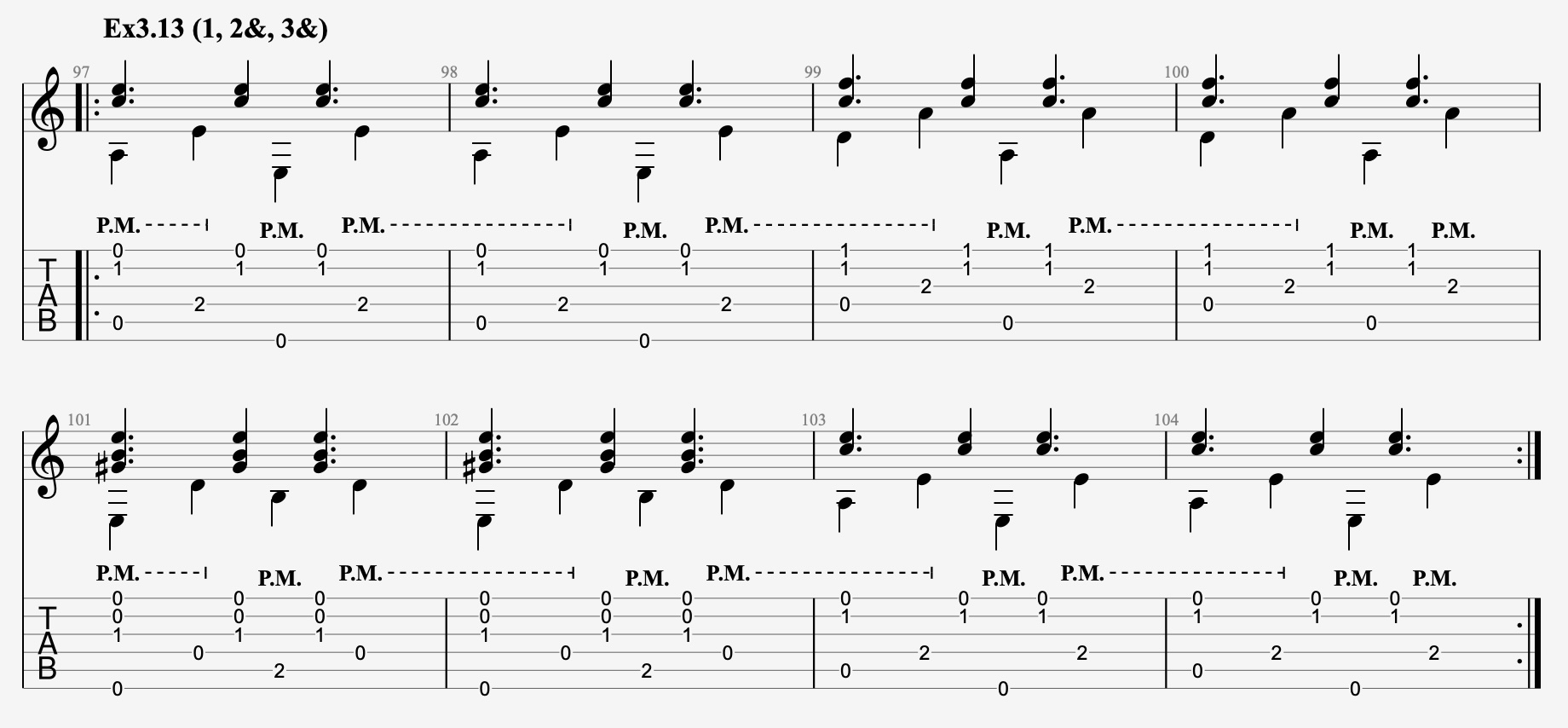
<p>Here is an example — Ex3.13, the Classic Travis pattern — to give you a sense
of what a rudiment looks like:</p>

<figure class=""><img src="/assets/images/rhythmic-rudiments-ex3.13.jpg" alt="Ex3.13: Classic Travis picking rhythm" /><figcaption>
      Ex3.13: Classic Travis picking rhythm

    </figcaption></figure>

<p>The rudiments are organized by how many times the fingers play per measure.
Call that value N. There is a Guitar Pro file for every value of N from 0
through 8.</p>

<p>When N equals 1, the fingers play a melody note exactly once per bar. There
are eight possible positions for that single note: any of the on-beats (1, 2,
3, or 4) or the off-beats (1&amp;, 2&amp;, 3&amp;, or 4&amp;). Thus the file
“rhythmic-rudiments-ex1.gp” contains eight rudiments, Ex1.1 through Ex1.8.</p>

<p>When N equals 2, the fingers play twice per bar. As you might recall from math
class, the number of possible combinations grows rapidly, giving us Ex2.1
through Ex2.28. The number of combinations peaks when N equals 4 and then
declines in a mirror-like fashion. At the extremes, there is only one possible
arrangement. Here is the full tally:</p>

<table>
  <thead>
    <tr>
      <th style="text-align: right">N</th>
      <th style="text-align: right">Rudiments</th>
    </tr>
  </thead>
  <tbody>
    <tr>
      <td style="text-align: right">0</td>
      <td style="text-align: right">1</td>
    </tr>
    <tr>
      <td style="text-align: right">1</td>
      <td style="text-align: right">8</td>
    </tr>
    <tr>
      <td style="text-align: right">2</td>
      <td style="text-align: right">28</td>
    </tr>
    <tr>
      <td style="text-align: right">3</td>
      <td style="text-align: right">56</td>
    </tr>
    <tr>
      <td style="text-align: right">4</td>
      <td style="text-align: right">70</td>
    </tr>
    <tr>
      <td style="text-align: right">5</td>
      <td style="text-align: right">56</td>
    </tr>
    <tr>
      <td style="text-align: right">6</td>
      <td style="text-align: right">28</td>
    </tr>
    <tr>
      <td style="text-align: right">7</td>
      <td style="text-align: right">8</td>
    </tr>
    <tr>
      <td style="text-align: right">8</td>
      <td style="text-align: right">1</td>
    </tr>
    <tr>
      <td style="text-align: right">Total</td>
      <td style="text-align: right">256</td>
    </tr>
  </tbody>
</table>

<h2 id="how-to-eat-an-elephant">How to eat an elephant</h2>

<p>Nobody picks up a guitar to drill rudiments — we come for the songs. I
approach technical skill-building in small increments: about five minutes at
the start of each practice session. The first time I worked through these
rudiments, I probably spent a few months on them. At the time I was somewhere
in the beginner-to-intermediate range for fingerstyle guitar, so a true
beginner would need to budget more time per rudiment than I did.</p>

<p>Some of these exercises are easy — a session or two and they are done. Others
might take several days. My advice is not to grind on any single one for too
long. Work on it for a bit, set it aside if you are not yet fluent, and come
back the next day. Your brain and hands keep working after you put the guitar
down. Small bits of steady, focused practice can accomplish more than most
people expect.</p>

<h2 id="whole-elephant-too-much">Whole elephant too much?</h2>

<p>If 256 rudiments sounds like more than you want to tackle, there are a couple
of ways to reduce the scope.</p>

<p>The first, intended for the maximally impatient or time-constrained, is a
bare-bones set of five exercises that represent the essential core of the
fingerstyle, roots-oriented genre, drawn from the family of Travis picking
patterns — “Five fingerstyle rhythmic patterns you MUST know” in the jargon of
our time.</p>

<p>The second is a larger selection, roughly a quarter of the full set,
consisting of the rudiments I found most musically interesting. Both are
described below.</p>

<h2 id="travis-picking-patterns">Travis picking patterns</h2>

<p>Some of these rudiments correspond to picking patterns that are well-known in
the fingerstyle world. Start with Ex3.13, which most players would recognize
as the rhythmic structure of the quintessential Travis picking pattern.<sup id="fnref:2" role="doc-noteref"><a href="#fn:2" class="footnote" rel="footnote">2</a></sup></p>

<p>Strip away one melody note and you get Ex2.3, a minimal Travis variant that
sounds great and reveals something important by isolating the defining
characteristics of the style: a melody note on beat 1 paired with a syncopated
melody note on beat 2&amp;. That is the heart of Travis picking.</p>

<p>Going the other direction — adding a melody note — gives us Ex4.30, the
rhythmic shape of the picking pattern used in songs like “Dust in the Wind.”
Notice what was added: another syncopated note on beat 4&amp;.</p>

<p>Take one more step and add the final syncopated melody note, on beat 1&amp;, and
you arrive at Ex5.15. I tend to call this the Busy Travis pattern, but it
could also be called the London pattern for convoluted reasons.<sup id="fnref:3" role="doc-noteref"><a href="#fn:3" class="footnote" rel="footnote">3</a></sup></p>

<p>As a final variation, drop the melody note on beat 1 from Busy Travis and you
get Ex4.50 — the rhythmic shape of the outside-inside and inside-outside
patterns described in Mark Hanson’s classic “The Art of Solo Fingerpicking.”</p>

<table>
  <thead>
    <tr>
      <th>Exercise</th>
      <th>Melodic rhythm</th>
      <th>Picking pattern</th>
    </tr>
  </thead>
  <tbody>
    <tr>
      <td>Ex2.3</td>
      <td>1, 2&amp;</td>
      <td>Minimal Travis</td>
    </tr>
    <tr>
      <td>Ex3.13</td>
      <td>1, 2&amp;, 3&amp;</td>
      <td>Classic Travis</td>
    </tr>
    <tr>
      <td>Ex4.30</td>
      <td>1, 2&amp;, 3&amp;, 4&amp;</td>
      <td>Dust</td>
    </tr>
    <tr>
      <td>Ex5.15</td>
      <td>1, 1&amp;, 2&amp;, 3&amp;, 4&amp;</td>
      <td>Busy Travis / London</td>
    </tr>
    <tr>
      <td>Ex4.50</td>
      <td>1&amp;, 2&amp;, 3&amp;, 4&amp;</td>
      <td>Outside-inside / Inside-outside</td>
    </tr>
  </tbody>
</table>

<h2 id="quarter-elephant-my-favorites">Quarter elephant: my favorites</h2>

<p>When I worked through these rudiments a second time, in preparation for
writing this post, I kept a running list of favorites — the rudiments I found
most fun to play, those with clear connections to known picking patterns, and
those that struck me as having obvious musical potential.</p>

<p>If you work through all of the rudiments, you will discover that some of them
are musically quite dull: play a melody note on every downbeat and you get
something mechanical, almost robotic. Others, as N grows large, feel more like
hand calisthenics than music. I worked through all of them and believe they
were useful for skill building, but a fair number felt like chores.</p>

<p>One important caveat: absence from this list should not be read as a negative
musical verdict. These rudiments use a static melody: combine that with a
predictable rhythm and you get boredom. Some truly wonderful picking patterns
— Ex5.15 and Ex4.50 among them — sound unremarkable in the context of a
static-melody rudiment but come alive when the melody moves.</p>

<table>
  <thead>
    <tr>
      <th>GP file</th>
      <th>Favorite rudiments</th>
    </tr>
  </thead>
  <tbody>
    <tr>
      <td>Ex1</td>
      <td>1, 2, 4</td>
    </tr>
    <tr>
      <td>Ex2</td>
      <td>1, 3, 5, 8, 9, 13, 16, 17, 19, 20, 21, 22, 27</td>
    </tr>
    <tr>
      <td>Ex3</td>
      <td>2, 4, 6, 12, 13, 14, 15, 27, 31, 33, 35, 36, 45, 49, 50</td>
    </tr>
    <tr>
      <td>Ex4</td>
      <td>6, 8, 9, 13, 14, 24, 30, 31, 37, 44, 46, 48, 49, 50, 67, 69</td>
    </tr>
    <tr>
      <td>Ex5</td>
      <td>9, 15, 18, 24, 32, 34, 41, 45, 54</td>
    </tr>
    <tr>
      <td>Ex6</td>
      <td>4, 5, 8, 11, 13, 14, 17, 19, 24, 26</td>
    </tr>
  </tbody>
</table>

<p>A different way to reduce scope is to focus on the lower values of N. Whether
you aim to practice all 256 rudiments or just the favorites listed above, the
best return on your practice time will come from the first few files. As N
increases beyond 3 or 4, the field becomes dense and the musical payoff
shrinks somewhat. That said, I think I benefited from working through all
of the rudiments. As the number of melody notes increases, the challenge
becomes protecting the spaces between notes.</p>

<h2 id="finding-the-music">Finding the music</h2>

<p>Whether you tackle all 256 or just a subset, treat each rudiment as a musical
performance, not a drill. Dynamics, articulation, sustain, and palm muting are
all available — use them. Some rhythms work well with a flowing, sustaining
approach. Others sound too busy that way; aggressive muting or staccato can
clarify things. Occasionally a rudiment that feels uninspiring when plucked in
a standard fingerstyle manner becomes interesting when the melody notes are
played with more of a strumming motion (Ex2.27 is one example among many).</p>

<p>When approaching chord changes, strategic muting or staccato can convert a
moment that might sound clumsy into something intentional. This matters most
when melody notes fall on beat 4 or beat 4&amp;, right before the bar line. It is
no accident that the Classic Travis pattern contains no 4&amp; melody note. The
players who developed these patterns were practical musicians who knew what
they were doing.</p>

<h2 id="when-to-say-when">When to say when</h2>

<p>When have you finished a rudiment? My approach was to set a target tempo and
stop when I could play the exercise with control and accuracy at that speed.
The Guitar Pro files are set at 120 BPM, which is generally where I stopped.
For exercises that were more musically appealing, I sometimes raised the bar.
Speed was not a primary concern for me.</p>

<h2 id="variations-to-consider-or-reject">Variations to consider or reject</h2>

<p>You could extend this work in several directions: single melody notes rather
than intervals, swing eighth notes rather than straight, a steady bass rather
than alternating, or a different chord progression.</p>

<p>The first variation — reducing to a single melody note — is the best
simplification for beginners because it narrows the scope to just rhythmic
coordination between an alternating thumb and a single melody note.</p>

<p>I am less certain about the other variations. I did not practice these
rudiments with swing eighths, though I play a fair amount of music with swing
rhythm. My rough sense is that the coordination skills practiced in straight
time seemed to transfer readily to swing rhythms.</p>

<p>Regarding steady bass: not worth the trouble. Alternating bass is the harder
coordination challenge, and if you can maintain rhythmic independence against
an alternating thumb, steady bass will take care of itself. A beginner might
reach for steady bass as a simplification, but the left hand work here is
already minimalist — dive straight into alternating bass.</p>

<p>Different chord progressions are a more reasonable variation, but I am not
sure they are worth pursuing exhaustively. The progression here already covers
the primary bass-picking motions that appear in much blues, rock, and
traditional fingerstyle music: an Am and a C chord involve the same bass
motion; an E7 and a D chord in drop-D tuning share the same motion. The key
skills here are rhythmic. Once you have the coordination, applying it to new
chords is a left-hand problem.</p>

<h2 id="the-goods">The goods</h2>

<p>At last, here are the Guitar Pro files: <a href="/assets/downloads/rrs/rhythmic-rudiments-ex0.gp">Ex0</a>, <a href="/assets/downloads/rrs/rhythmic-rudiments-ex1.gp">Ex1</a>,
<a href="/assets/downloads/rrs/rhythmic-rudiments-ex2.gp">Ex2</a>, <a href="/assets/downloads/rrs/rhythmic-rudiments-ex3.gp">Ex3</a>, <a href="/assets/downloads/rrs/rhythmic-rudiments-ex4.gp">Ex4</a>, <a href="/assets/downloads/rrs/rhythmic-rudiments-ex5.gp">Ex5</a>, <a href="/assets/downloads/rrs/rhythmic-rudiments-ex6.gp">Ex6</a>,
<a href="/assets/downloads/rrs/rhythmic-rudiments-ex7.gp">Ex7</a>, <a href="/assets/downloads/rrs/rhythmic-rudiments-ex8.gp">Ex8</a>.</p>

<p>If Guitar Pro is outside your budget there are several applications and
websites that can read and play these files. One worth naming explicitly,
because it is open-source and free, is <a href="https://www.tuxguitar.app/">TuxGuitar</a>. It handles most of
what Guitar Pro does.</p>

<div class="footnotes" role="doc-endnotes">
  <ol>
    <li id="fn:1" role="doc-endnote">
      <p>I say “almost” because some musical material involves different
combinations of right-hand fingering that can feel challenging or
counterintuitive. But examples like this are not particularly common once
you have achieved the ability to play the rudiments presented here. <a href="#fnref:1" class="reversefootnote" role="doc-backlink">&#8617;</a></p>
    </li>
    <li id="fn:2" role="doc-endnote">
      <p>Travis picking as a named technique is partly a modern construct. My
rough understanding is that the historical <a href="https://www.youtube.com/watch?v=vjwFhqJCVe0">Merle Travis</a> did not
play using the patterns now called Travis picking. The label came later
and the patterns were codified by others. <a href="#fnref:2" class="reversefootnote" role="doc-backlink">&#8617;</a></p>
    </li>
    <li id="fn:3" role="doc-endnote">
      <p>The naming gets confusing here. Dan Thorpe, who teaches a pattern he
calls the London pattern (named after Ralph McTell’s “Streets of London”),
uses that name for what I call the Dust pattern, Ex4.30. However, as best
I can tell, “Streets of London” mostly uses Busy Travis, Ex5.15, and the
rhythm of Ex4.30 appears only occasionally in the song — hence my
attachment of the name London to Ex5.15, not Ex4.30. <a href="#fnref:3" class="reversefootnote" role="doc-backlink">&#8617;</a></p>
    </li>
  </ol>
</div>]]></content><author><name>{&quot;name&quot;=&gt;&quot;&quot;, &quot;avatar&quot;=&gt;&quot;/assets/images/juan-gris-guitar-color.jpg&quot;, &quot;bio&quot;=&gt;&quot;&quot;}</name></author><summary type="html"><![CDATA[Guitar Pro files with 256 exercises covering every eighth-note melody rhythm against an alternating bass.]]></summary></entry></feed>