Of mice and menus: an interface tragedy
All software faces a basic question: how does the user tell it what to do?
Since the 1980s the dominant model has been drearily consistent: reach for the
mouse, navigate into an application’s menus, and click the needed operation.
Ordinary navigational tasks are similar, minus the menus: reach, point,
scroll, click. Keyboard shortcuts for some of those operations exist. Nearly
all users learn a handful — copy, paste, print, arrow keys — and stop there.
Some users invest real effort to learn the key bindings of applications they
use heavily, but even the office expert in Excel hits a ceiling: the brain
will hold only so many arbitrary Ctrl-Alt combinations.
I recently completed LoopLlama, a browser-based tool for close study of YouTube videos. The application has menus and familiar mouse-oriented controls such as buttons, dropdowns, and toggles. But at its core, LoopLlama has a keyboard-first design: my goal was to control everything with simple key presses while holding a guitar and wearing a thumb pick. Building it sharpened my convictions, and the application is a distilled example of a better interface paradigm — one with strong historical precedents that computing culture ignored as it solidified in the late twentieth century.
The trouble with mice
The mouse is an instrument tuned for spatial actions: pointing, dragging, positioning, drawing — tasks with a direct mapping between hand movement and cursor position.
Command input is not that. When a user reaches for the mouse to invoke a menu item or to navigate, nothing about the operation requires pointing. The action is discrete: the user wants to save a file, undo a change, or toggle a setting. The mouse arrives at the target by the same mechanism it uses to draw a curve — slow physical travel, target acquisition, and click — but the curve-drawing precision is wasted. You do not need a pointing instrument to say “save.” Like a caveman, you point for routine actions only because you lack the words.
The costs are individually tiny, but across a day of mousing the ergonomic and time tax adds up. Mouse operations are also not readily chained or scripted. The keyboard, by contrast, is already where the hands are, and its input is precise and composes naturally into automated operations.
The problem was recognized early in computing history. Two examples will suffice:
-
Douglas Engelbart led the Augmentation Research Center in SRI International during the 1960s. In 1968, Engelbart and other ARC staffers presented their oN-Line System (NLS), which introduced many of the elements of modern, interactive computing, including the computer mouse. The presentation was so striking to subsequent observers that it became known as The Mother of All Demos. Aiming to make knowledge work more powerful, Engelbart and his team understood the division of labor sketched above. NLS paired the mouse with the keyboard: the mouse for spatial tasks, the keyboard for text entry and commands.1 Only the pointing half of that vision survived contact with the marketplace.
-
Later in the 1980s and 1990s, human-computer interface expert Jef Raskin put the case in more rigorous terms, drawing on empirical models of human motor performance and task completion time.2 Applied to command input, they confirmed and quantified the argument: mouse operations are slower than keyboard equivalents for commands.
The command-line and its constraints
Although the consumer market would become dominated by mouse-and-menus, an older tradition — Unix and the command-line world — had built a culture around keyboard primacy. Since command-line computing became powerful before the mouse existed as a widely available device, the mouse could only augment it at the margins.
Applications in that computing tradition faced an unavoidable constraint: their large command vocabularies exceeded the keyboard’s limited real estate. A typical modern keyboard has about 50 keys producing regular characters, and only 26 of them (the letters) have obvious mnemonic potential. LoopLlama, for example, is a rich application for its purpose, but it is tiny compared to the software that computer users spend the most time with: word processors, spreadsheet applications, web browsers, and many others. LoopLlama has roughly 100 bindings to cover its operations — already twice the keyboard’s raw capacity.
The dominant answer to that constraint was keyboard expansion, along two pathways. One was additive: function keys, a dedicated row of extra keys above the main keyboard, provided 12 new binding slots.
The second was multiplicative: modifier keys. A keyboard’s default behavior is
to emit a character on each key press; a modifier intercepts that signal and
redirects it, allowing the same key to serve double duty. As modifiers
accumulated over time — Ctrl in early terminals, Alt from the IBM PC,
Cmd and Option from the Mac — the available binding space grew
accordingly.
By the end of the 1990s, a keyboard-oriented user had not only more keys — function keys, arrows, a navigational cluster, and a number keypad — but also several modifiers. The net effect was substantial. Applications running in those environments had hundreds of available binding slots, roughly 800 by my back-of-the-envelope calculation.
Although the expansion of key binding real estate was impressive in raw
numbers, most of that terrain turned out to be useless in practice, because
humans cannot remember the bindings. The letter component of a binding can
carry meaning: Ctrl-p for print, Ctrl-s for save, Ctrl-c for copy. But the
modifiers themselves are abstractions. Any given operation might use Ctrl,
Ctrl-Shift, Ctrl-Alt, or something more elaborate. Under favorable
conditions, a well-designed application could group bindings thematically
under different modifier combinations to reduce the mnemonic burden. In
practice, the logic behind the binding schemes of many major applications is
somewhere between opaque and non-existent.
The other problem with the modifier strategy is physical. Although Shift
sits at the natural extension of the pinky, the primary modifiers for issuing
commands are ergonomic disasters, involving either awkward stretches to reach
a single modifier or full shifts out of typing position to press more than
one.
In the consumer market, a third pathway emerged. For many operations, there would simply be no key binding. Most users learned a handful of keyboard shortcuts and stopped there. The rest of their command vocabulary lived behind menus and long days of point and click.
One response to those constraints was a call to embrace expertise — to stop complaining about the difficulty of keyboard mastery and invest the effort to achieve it. No one made that case more vividly than Neal Stephenson in the 1999 essay, “In the Beginning… Was the Command Line”, which portrayed Linux as a freely available tank, Windows as a breakdown-prone station wagon, and Mac as an elegant but confining sports car. Stephenson understood why so many users opted for the initial ease and reassurance of purchasing from a friendly dealer, but he upheld the virtues of the few who would invest the time to learn how to drive and maintain a tank.
Stephenson’s case addresses a minority; a related question about expertise applies broadly. Because their needs do not justify it, most people will never invest that heavily in most of the software they use. But most people have at least one application they use often enough to warrant such investment: the person who spends a significant chunk of every workday in Word, Excel, or Outlook; the retiree who manages a photo collection in Lightroom; the teacher who assembles lecture slides in PowerPoint. Additional expertise would pay off, but if the route to expertise goes through a thicket of modifier-based key bindings, few will make the journey.
Raskin’s case against modes
Interface expert Jef Raskin had long criticized both computing paradigms on offer. On one pole was the expert-oriented computing tradition of Unix and the command-line. Although powerful, this user interface provided poor visual feedback and was too demanding for ordinary computer users. Since it had already lost any claim on the mainstream, it was not his primary target. Meanwhile, the GUI systems from Microsoft and Apple had become almost as opaque as the command-line systems they replaced, with deep menu hierarchies that required users to know where to look when trying to perform a task — a mnemonic burden in a new form.
In 2000, Raskin published The Humane Interface, which brought together critiques he had been developing since the 1980s. The book’s guiding claims were that interfaces should prioritize alignment with human cognition rather than computer internals and that design should aim to increase efficiency for all users, not just dedicated experts.
Both cognitive science and everyday experience show that practiced actions become automatic: driving, typing, using a TV remote, riding a bicycle. A central idea in Raskin’s work is that good interfaces should aim to support automaticity — for users to stop consciously deciding and simply to act. By contrast, interfaces that change from version to version; that have different behaviors in different contexts, forcing users to track state; that provide insufficient feedback or have large delays between action and response; that have high error costs (for example, no undo) — such traits force users to act consciously rather than automatically.
Raskin identified modes as the most systematic of these failures. A mode is a
state of the interface in which the same user action produces different
results. The computing environment of the 1980s and 1990s supplied vivid
examples: the Caps Lock key, inherited from the typewriter, which silently
converted letter key presses to uppercase; word processors that toggled
between inserting and overwriting text; image editors and presentation tools
that required the user to track which drawing tool was active; and vi, the
command-line world’s dominant text editor, built on a modal foundation. In
each case, the same action — a key press or a mouse click — produced different
results depending on application state that the user had to remember.
In such interfaces, mode errors can occur any time the user becomes too preoccupied or rushed. Such errors were bothersome for novice users, but Raskin’s deeper critique emphasized how they undermined the automaticity that experts depend on. The same automaticity that makes experts efficient makes them particularly vulnerable to mode errors: the more fluidly an expert works, the longer they operate in the wrong mode before noticing — and the more damage accumulates.
Raskin’s prescription followed from the diagnosis: modes should be eliminated whenever possible. Where they could not be, his preferred alternative was the quasimode — a held key, active only while pressed. Unlike a persistent mode, a quasimode cannot be easily forgotten because it is tactile.
The Canon Cat: theory meets practice
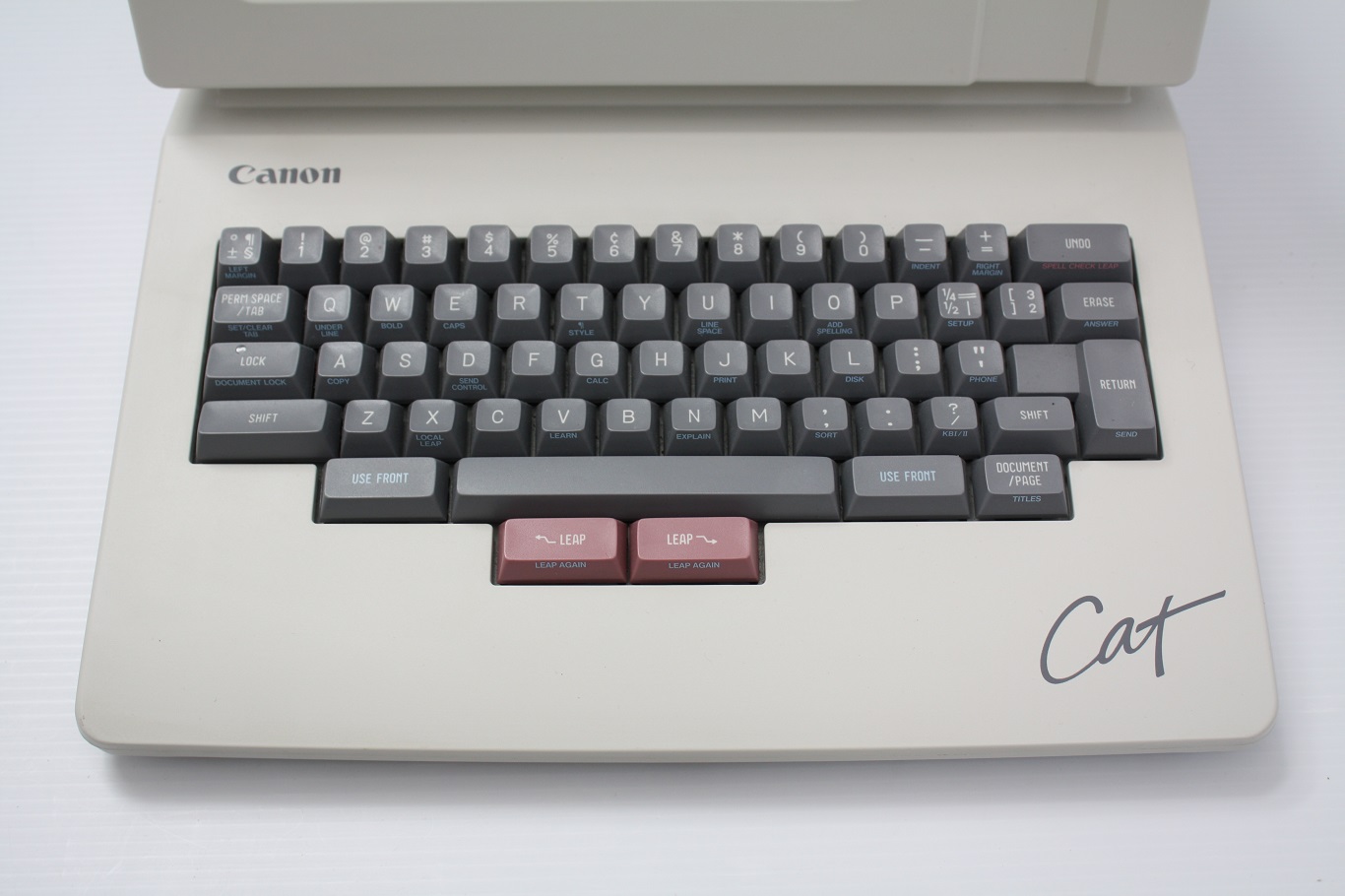
Although Raskin had played a leading role in an early phase of the Macintosh project, he was disappointed by the result — mouse-heavy, dependent on menus, prone to modal interruptions. In 1987, he led the design of an alternative: the Canon Cat, a word-processing computer that put into practice the interface principles he would later codify in The Humane Interface.
Following those principles, the Cat’s design rejected two of the three keyboard real estate strategies: the surrender approach, which exiled low-priority operations to menus; and modes, his primary target. That left keyboard expansion, specifically with modifiers. The Cat innovated on that approach in two ways:
-
The first was a pair of
USE FRONTkeys, positioned on the left and right sides of the spacebar, replacing the usual modifier keys in those spots. TheUSE FRONTkeys activated a quasimode: holding the key changed the keyboard’s behavior. The payload was printed on the front edges of the keys — Copy, Calc, Print, Bold, Indent, Spell Checker, and so on. The hardware documented the software. -
The second was a pair of
LEAPkeys, positioned below the spacebar for thumb operation — a significant ergonomic improvement over the usual modifiers. HoldingLEAPwhile typing a literal string moved the cursor dynamically through the document as each character was entered — in effect, an incremental search. The same mechanism supported text selection: position the cursor at one endpoint,LEAPto the other, and then press bothLEAPkeys simultaneously to select the text between. LikeUSE FRONT, theLEAPkeys were quasimodal, active only while held, so their effect on the keyboard’s behavior was always explicit and tactile.
The Cat sold poorly and was discontinued after six months on the market. That failure could be attributed to bad timing or business strategy, but my judgment is that the Cat was built on a deeply flawed vision. Three problems stand out:
The first flaw was that the Cat ultimately embraced the surrender strategy. The GUI market surrendered by exiling lower-priority operations to menus. The Cat avoided that move, but only by restricting what the device could do. It was primarily a word-processing appliance, not a general-purpose computer. It had computing at the margins — a calculator accessible via the Calc key, and a lower-level toolchain for Forth and assembly — but it had no support for third-party software. The operation catalog could fit on the front edges of the keys precisely because the domain had been so thoroughly narrowed.
The second flaw was that LEAP, as the Cat’s sole navigation primitive, failed
both ends of the user spectrum, leaving it in an interface sour spot:
-
For beginners, the Cat was an RTFM device from the start. It had no arrow keys, leaving novices stranded. The
LEAPkeys could move the cursor one character at a time (called “creeping”), but the manual admonished users not to rely on creeping as a crutch. After a user learned to leap, the physical tax was permanent, because every navigation required holdingLEAPwhile typing a search string. That is the inescapable cost of the quasimode approach — the same cost paid by every modifier scheme — but magnified to include entire query strings. Finally, although the promotional video made the Cat look effortless, for less frequent operations the user manual told a different story: the instructions took real effort to decipher, and the key sequences seemed balky. -
For intermediate and expert users, the ceiling was low. Leaping was literal text search: no wildcards, regular expressions, or text objects.3 GUI word processors had long offered at least wildcards and navigational support for words and paragraphs. Command-line editors went much farther on both fronts. The best the user manual could offer was approximate literal-search workarounds for some text objects.
The Cat’s third flaw cut deepest, because it was a theory violation, not just a limit. Its cursor had two states — wide and narrow — that controlled the direction of text erasure and whether typing would insert or replace existing text. By Raskin’s own definition, this is a mode — and not a peripheral one. More striking still: the same behavior is found in vi, the command-line text editor proudly standing on the opposite side of the modes debate. Vi users switch between normal mode, insert mode, and replace mode — distinctions conveyed via cursor shape, just like the Cat. The most determined opponent of modes in computing built them into his signature product.
There will be modes
The Cat’s cursor mode is a clear violation of Raskin’s own theory and a clue that wisdom lies in the recognition that modes are unavoidable.
Applications required. The logical case begins with the inevitability of applications. To modern computer users, that is a puzzling place to start — a claim so obvious as to be hardly worth making. But Raskin’s writing and the Cat’s advertising material sometimes conveyed the idea that computer users should not have to bother with pesky details like applications, desktops, directories, and even files. At the same time, a promotional video for the Cat explicitly mentions spreadsheets and database applications running on the device. The admission was compelled because, by 1987, such applications were becoming standard in office computing. The video glosses over the contradiction: was the Cat an appliance optimized for editing text or a general-purpose computer? Anyone who has spent serious time in a spreadsheet application knows how fanciful that vision is. A spreadsheet is not a word processor, and a database application is not a spreadsheet. Each involves different data, different tasks, and thus different interfaces. Cramming Excel into a text editor will not cut it.
Applications are modes. Each application’s interface is a mode — a state in which the same keyboard and mouse inputs produce different results. To grant that different applications require their own interfaces — and there is no plausible argument against — is to grant that some modes are unavoidable.
Modes within applications. The same reasoning applies at the next level down. Many applications need to support multiple kinds of work. Mapping applications have searching and exploring, but also direct navigation to a destination. Presentation software is used to create slides and present them. More relevant for our purposes, many applications — notably, word processors, text editors, and spreadsheets — need to support at least two types of work: directly typing text versus issuing commands for editing and navigation. The more distinct the tasks, the stronger the case for distinct interfaces. Modes enter the scene again.
Refutation by counterexample: QED. If computing operates with at least two irreducible layers of modes — applications and then major task interfaces within them — a blanket prohibition cannot stand. In fairness, Raskin’s views were not that rigid, but he did make strong claims about the harmfulness of modes and his goal to eliminate them. At this point, however, a strong anti-modes stance has lost its footing: the debate is no longer whether modes are harmful or should exist; it shifts to sharper questions.
Those questions concern what makes modes cognitively manageable and worth having. Several criteria matter:
-
Visibility. A hidden mode will be forgotten, leading to errors. A clear indicator keeps the current mode in peripheral awareness without demanding attention.
-
Task clarity. The mode should correspond to work the user recognizes as meaningfully distinct. Modes organized around clear task differences give users a mental model: they implicitly know the current mode because they know what they are doing.
-
Switching cost-benefit. The transition should be easy and deliberate — frictionless when you mean to switch, specific enough to prevent accidents. And the mode’s value should justify the real estate cost of its entry binding.
-
Risk. Some mode errors are easily reversible; others can destroy work. The severity is part of the cost-benefit ledger.
Two classic examples illustrate how the criteria play out:
-
Caps Lockfails on most of them. Its indicator — at most, a small LED on some keyboards — is easy to overlook. Accidental activation is common because the key occupies prime real estate, where an errant pinky can easily land. And the task it serves — sustained all-caps typing — is infrequent for most users, with cheap workarounds in any modern editor. Valuable real estate, frequent mistakes, uncommon task: the cost-benefit is badly skewed. -
Vi’s insert and normal modes tell the other story. The task distinction is meaningful: typing text versus issuing commands. Switching cost is low: one key press in each direction. The risk from mode errors is real but substantially mitigated by vi’s strong undo system. The main shortcoming is visibility: a cursor-shape change alone — the mechanism used by the Cat — is too subtle. On balance, these modes earn their place.
Raskin’s core concern about modes was automaticity — that users would have to maintain conscious awareness of the current mode, and that this overhead would prevent frequent actions from becoming practiced habits. The concern is valid for poorly designed modes, but it gets the causation backward for well-designed ones. A mode organized around a clear task distinction does not burden the user’s cognitive apparatus — it becomes part of it. In vi, normal and insert modes do not interfere with each other because the system’s organization is sensible. The modes become an organizing hook — similar to the conceptual order that applications supply at a higher level.
Modes all the way down
Accepting that modes are inevitable and cognitively sound closes the case against them and reopens the keyboard real estate strategy Raskin had foreclosed: using modes to solve the problem directly.
That problem was a mismatch between command vocabulary size and available binding slots, producing the approaches already described: function keys, modifiers, and surrender to menus. All of them shared an assumption: that the keyboard’s default job is to emit characters, so bindings must be carved out against that baseline.
A dedicated typing mode dissolves the assumption. Once the application has a
specific mode for text entry, ordinary characters become available in every
other mode. The letters, digits, and punctuation marks become binding real
estate — no modifier required, no awkward reaches. Every key has the potential
to carry meaning directly (d for delete, w for word, - for decrease).
None of the keys are pure abstractions the way the modifiers are. A typing
mode is an architectural move that restructures the real estate problem.
That expansion is the first step. The second adds structure to the binding scheme, making it more meaningful and memorable. The normal-mode bindings of vi are illustrative. That command space is not a flat list of bindings to be memorized; it is built from a small vocabulary of atoms governed by a grammar, and the grammar generates operations combinatorially.
The atoms come in three roles. Verbs express operations, such as d for
delete, y for yank (copy), and c for change. Nouns name text objects or
navigation targets: for example, w for word start, ap for a paragraph
including its following blank lines, or L for the last line on the screen.
Quantifiers are numeric prefixes that scale the verb, the noun, or both. Users
learn those atoms, and the grammar makes their combinations largely derivable:
dw deletes a word; d5w deletes five; 3yap yanks three paragraphs
starting with the current. Some verbs can act as stand-alone imperatives — i
to enter insert mode, p to paste — with no noun required. A modest
vocabulary of verbs and nouns can generate a wide variety of commands. The
grammar does most of the memorization work.
The arithmetic is striking. A modifier strategy starting with 26 letters and
adding Shift yields 52 binding slots. A multi-key strategy using the same 26
letters as two-character sequences yields 676 (plus another 676 if we bother
with Shift). But the raw count understates the advantage, because the two
approaches differ not just in quantity but in mnemonic quality. A modified
binding requires two key presses but only one of them carries meaning. In a
multi-key scheme, both keys can do so: the first key is a prefix that
organizes a family of related commands; the second identifies the specific
operation within that family.
A multi-key scheme dominates a modifier scheme not just quantitatively but ergonomically: no awkward stretches, hand shifts, or simultaneous presses.
Finally, such binding systems have a deeper advantage. Every fluent speaker uses a grammatical system orders of magnitude more complex than any application’s command vocabulary. The cognitive machinery for structured, rule-governed recall is not exotic; it is among the most practiced capabilities humans have. Multi-key, grammar-based bindings plug into that machinery. Modifier-based bindings do not — they are arbitrary pairings the brain must hold by rote.
The Llama
LoopLlama is built on those principles: a modal keyboard, an intuitive grammar, and multi-key bindings.
Mnemonic atoms. The grammar’s elements are directly
mnemonic whenever possible. The language has nouns, such as v for video, c
for chapter, s for section, or m for mark. And it has verbs like e for
edit, j for jump, d for delete, or z for zoom.
Noun then verb. With the vocabulary in place, the
combinations are predictable: for example, ve to edit the current video,
mj to jump to a mark, or sd to delete a section.
Doubles are prime real estate. The most frequent
operations get the double-key bindings — the easiest sequence to type. For
example, creating a new entity uses its prefix key doubled: cc for chapter,
ss for section, ll for loop, and mm for mark.
Mnemonic exceptions, thoughtfully done. As ever,
real estate is precious. For example, with the s and l prefixes already
claimed by sections and saved loops, the scratch loop (the application’s work
area for looping) needed a different prefix. The letter x was chosen, in
part, because it carries the connotation of “scratch out.” A related example
is the collection of bindings for the looping start and end points. Each point
has a prefix — [ for start and ] for end — and the bracket pair carries
the connotation of an enclosed loop. Although direct mnemonic connections are
preferred, indirect ones serve when necessary. The grammar carries most of the
cognitive load; a few departures do not break it.
Multi-key structure enables discoverability. When the user presses any binding prefix, a compact display of available completions appears at the bottom of the screen. The user encounters the hint at the moment of need — already reaching for the command, not browsing a reference page. This is the scalable version of what the Canon Cat attempted with its printed key labels: contextual, just-in-time, and hardware-independent.
The cognitive demands of learning LoopLlama’s binding system are lower than those of learning its features — which the user has to master regardless. The bindings come nearly for free once the vocabulary is in place.
The tragedy
A specific mode for direct typing, a vocabulary of nouns and verbs, and multi-key sequences organized by grammar produce an input system that is more capacious, memorable, and ergonomic than the mouse-menus-modifiers paradigm can deliver. LoopLlama is evidence that the approach can be taken to its logical conclusion. Vi is evidence that it can sustain millions of users across decades.
Lock-in to suboptimal technologies is common enough in history. What converts this outcome from unfortunate to tragic is how thoroughly experimentation stopped. The early period of personal computing was genuinely exploratory. Engelbart’s NLS paired mouse and keyboard on principled lines. The Unix philosophy of small, composable tools demonstrated the power of keyboard-first computing — a system architecture as much as an interface. Vi brought modal, grammar-based editing to Unix in the late 1970s. Even the mouse-and-menus of the Mac — although a prime target of this essay’s critique — was truly innovative. Raskin responded by designing the Canon Cat and eventually writing The Humane Interface. Those efforts had their flaws, but the field was alive to the problem. Then the Windows and Mac operating systems won commercially, and the exploration largely ended. The major platform makers have issued new versions for decades with minimal change to the input model.
That stagnation is conspicuous. Computing is the field most associated with relentless change. Processing power, storage, networking, displays, software distribution, and application domains have all been transformed since the 1980s. The direct, tactile question of how the user tells the computer what to do has not. A better approach was visible from the beginning. The tragedy is that we looked away.
-
NLS included both a regular keyboard and a chorded keyboard — a five-key device held in the non-dominant hand, used as a dedicated command interface while the mouse hand was occupied. ↩
-
Fitts’s Law predicts target-acquisition time as a function of target distance and size, and the Keystroke-Level Model predicts task completion time from its physical components. ↩
-
A text object is a structural element that an editor recognizes as a target for navigation or editing: a word, sentence, paragraph, line, or — in code-aware editors — a parenthesized expression, quoted string, or indented block. The user names the unit and the editor locates its boundaries automatically: “move to the next sentence,” “delete the current paragraph.” ↩